Choosing a slicer-ready setup for Creality printers involves aligning hardware capabilities with software configurations. A solid slicer workflow depends on reliable bed leveling, steady extrusion, and clean filament feeds. This guide highlights five Amazon-listed Creality products that support smoother slicing and better prints—from high-speed printers to essential accessories. Each section explains how its features relate to slicing quality, print reliability, and workflow efficiency. Use the Buying Guide below to compare options and pick items that fit your Creality system and your printing goals.
| Product | Brand | Build Volume (approx) | Notes |
|---|---|---|---|
| Creality Ender 3 V3 SE 3D Printer | Creality | 8.66 x 8.66 x 9.84 in | 250 mm/s speed, Sprite direct extruder, CR Touch auto leveling |
| Creality 3D Printer Tool Kit With Case 35Pcs | Wolias | N/A | Comprehensive maintenance and cleaning tools in a rugged case |
| Creality K2 Plus Filament Cutter 10PCS | Creality | N/A | Official cutter modules, fast cut-off for multiple filaments |
| Creality Official 3D Printer Extruder | Creality | N/A | Upgraded aluminum drive, adjustable gear pressure |
| Creality Hi(A) 3D Printer | Creality | 10.24 x 10.24 x 11.81 in | Hyper-speed 500 mm/s, RFID filament detection, all-metal frame |

Creality Ender 3 V3 SE 3D Printer
The Ender 3 V3 SE raises print speed to 250 mm/s with a robust 2500 mm/s² acceleration, enabling rapid prototyping without sacrificing core print quality. The Sprite direct extruder is a full-metal, dual-gear design that minimizes filament slipping and maintains steady flow through the nozzle—an important factor when slicing settings push for higher extrusion rates. Auto leveling via CR Touch simplifies bed calibration, ensuring a more consistent first layer across prints. For slicers, this means more repeatable layer adhesion and less fine-tuning after each calibration pass.
With improved feeding reliability and a streamlined leveling workflow, users can test slicer profiles for different materials—PLA, PETG, and flexible filaments—more efficiently. The compact footprint makes it ideal for desks or classrooms while still delivering a capable platform for refining print profiles and experimenting with layer heights, speeds, and retraction settings. For those prioritizing speed and reliability in Creality workflows, this printer offers a balanced foundation for slicer-driven optimization.
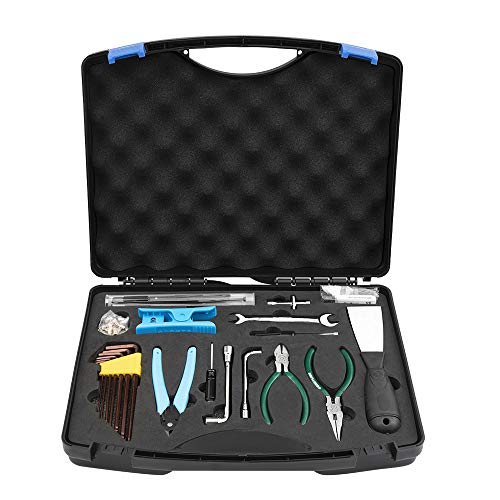
Creality 3D Printer Tool Kit With Case 35Pcs
Maintenance matters for slicer-driven workflows because consistent extrusion and clean starts depend on well-tuned hardware. This 35-piece toolkit includes Allen wrenches, wrenches, scrapers, cutters, and multiple cleaning tools, all housed in a rugged ABS case. The assortment supports nozzle changes, belt adjustments, and regular maintenance tasks that keep printers performing predictably with consistent filament flow. For slicer users, a stable mechanical baseline reduces the need for frequent re-tuning of profiles after mechanical tweaks, helping maintain reliable first layers and repeatable extrusion behavior.
Notably, the kit includes 0.4 mm, 0.2 mm, 0.3 mm, 0.5 mm, and 0.6 mm extruder nozzles, along with cleaning needles and PTFE tubing tools. This variety makes it feasible to experiment with different nozzle diameters and flow characteristics in slicer profiles, contributing to better surface finishes and accurate layer heights across diverse prints. The included storage box keeps tools organized, minimizing downtime during print series and calibration sessions.

Creality K2 Plus Filament Cutter 10PCS
Filament preparation plays a critical role in successful slicer output. This official cutter set provides ready-to-replace modules and 10 pieces of cutter blades, enabling quick, clean cuts that minimize filament deformation at splice points and retain consistent filament diameter. Clean cuts help ensure stable extrusion rates and predictable retractions in your slicer profiles, especially when switching between filaments like PLA, ABS, and PETG. The fast, precise cuts reduce extrusion inconsistencies that can cause under- or over-extrusion in the first few layers of a print.
The cutter set is designed for durability, with high-strength materials that resist wear. For users updating or rebuilding print hardware, reliable filament endings translate into smoother slicer results and fewer failed starts, contributing to more efficient print sessions and better overall print quality.
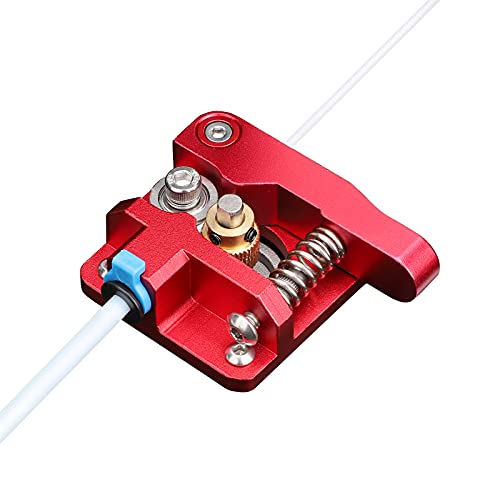
Creality Official 3D Printer Extruder
The upgraded aluminum drive extruder features a durable build and a full-metal gearing system designed to push filament smoothly into the hot end. A design change removes the pneumatic joint, increasing gear density and reducing the risk of joint fractures under load. The ability to adjust gear pressure through bolts helps fine-tune filament grip, supporting consistent extrusion across different materials and nozzle sizes. For slicer users, this means more predictable extrusion behavior, enabling reliable flow rates and stable layer deposition as you test new profiles or switch filament types.
In practical terms, a robust extruder reduces the probability of skipped steps and under-extrusion, which in turn makes slicer calibration easier. Users can focus on layer height, wall thickness, and infill strategies with less concern about feed issues that can disrupt print quality mid-run.
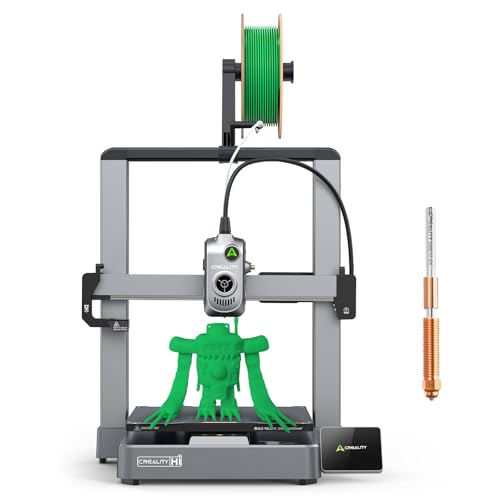
Creality Hi(A) 3D Printer
The Hi(A) model pushes high-speed printing with speeds up to 500 mm/s and acceleration of 12,000 mm/s², backed by an all-metal frame and linear rails for rigidity. Build reliability is enhanced by an RFID filament management system that detects filament type and color, plus run-out detection and auto relay. For slicers, the combination of high-speed capability and robust motion control demands careful tuning of layer height, wall thickness, and temperature to preserve print quality at speed. The automatic calibration features, including auto leveling and input shaping tests, streamline setup before loading new profiles.
With its industrial-grade motion system and advanced calibration tools, this printer supports experiments with aggressive print profiles and complex infill patterns. Slicers can leverage these capabilities to push larger builds or faster iterations while maintaining consistent results across materials and nozzle configurations.
Official Creality Ender 3 V3 Plus 3D Printer

The Ender 3 V3 Plus expands capacity with a larger build volume of 11.81 x 11.81 x 12.99 inches, enabling bigger prints and fewer part splits in longer projects. It can reach high-speed printing up to 600 mm/s with rapid acceleration, driven by a dual Z-motor setup and automatic belt tensioning to prevent jams. Auto-leveling and auto-calibration routines ease setup, allowing you to dial in slicer profiles quickly. The XZ-base rigidity supports stable motion at higher speeds, reducing vibrations that could affect print accuracy.
For slicer users, the larger build area means you can print multi-part assemblies in a single job, provided your profiles account for longer print times and potential cooling requirements. The auto-leveling and Z-offset features simplify first-layer reliability, which is critical when testing new materials and print strategies in your slicer workflow.
Buying Guide
- Print speed versus quality: Higher speeds require more aggressive cooling, stable bed leveling, and precise extrusion. When selecting a printer, consider your typical filament types and the slicer profiles you plan to use. Look for machines with auto leveling, rigid frames, and reliable hot-end assemblies.
- Build volume and print size: Larger builds enable single-piece parts or fewer post-processing joins, but they also demand more stable frame geometry and adequate cooling for higher layer counts. Match build volume to your typical model scale and slicer workflow.
- Filament management: Tools like RFID filament management and run-out sensors help keep prints moving smoothly. In slicer terms, stable filament feeding and predictable extrusion support more reliable layer deposition and fewer mid-print failures.
- Extruder and nozzle options: Upgraded extruders with adjustable gear pressure improve filament grip, especially with specialty materials. Having nozzle variety (0.2–0.6 mm) can let you tailor layer resolution and print speed for different projects in your slicer profiles.
- Maintenance tools: A comprehensive tool kit supports regular calibration, nozzle swaps, and belt adjustments. Keeping hardware in good condition reduces the risk of mechanical variances that would otherwise require constant slicer re-tuning.
- Software compatibility: Ensure your slicer (e.g., Cura, PrusaSlicer, or Simplify3D) can interface smoothly with the printer’s firmware and features like auto leveling and Z-offset calibration. Confirm firmware updates are available for optimal profiles and material libraries.
- Cost vs. value: When weighing accessories (extruders, cutters, tool kits), consider how much those items improve reliability and print quality. A modest investment in maintenance and upgrades can reduce wasted prints and save time in profile refinement.
In summary, the best slicer setup for Creality depends on matching the printer’s core capabilities with reliable extrusion, precise bed leveling, and robust filament management. The five products highlighted here cover a spectrum from high-speed printers to essential accessories that support smoother slicer-driven workflows. By focusing on auto leveling, extrusion reliability, build volume, and maintenance, you can build a versatile setup that scales with your printing goals.